 |
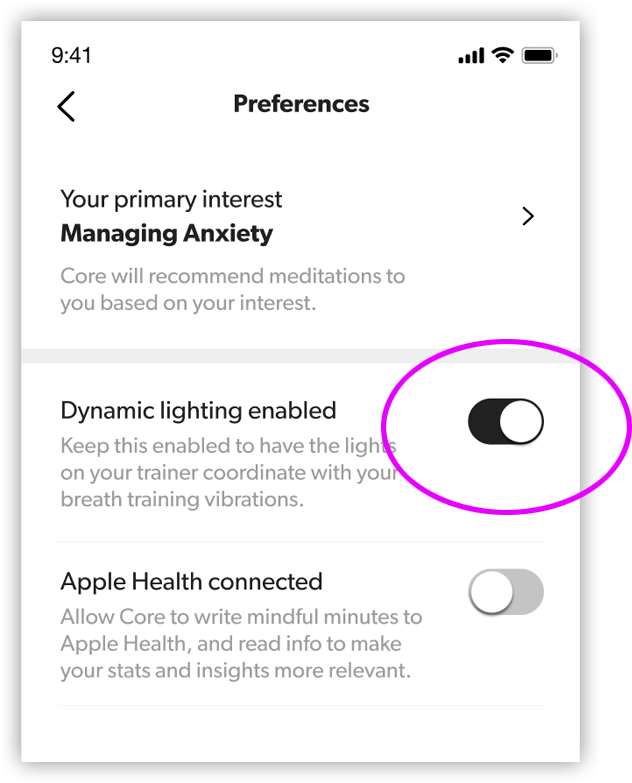
Disabling Dynamic LightingDuring meditation, the lights on the top of Core will cycle during active vibration patterns (breath training patterns.) This is meant to provide some extra guidance, or help reorient you in you lost track of where the inhale/exhale is supposed to be. If you’d prefer that the lights remain off, you can disable this feature by navigating to the “Profile” tab, selecting “Preferences”, then toggling “Dynamic lighting enabled” to the off position. |
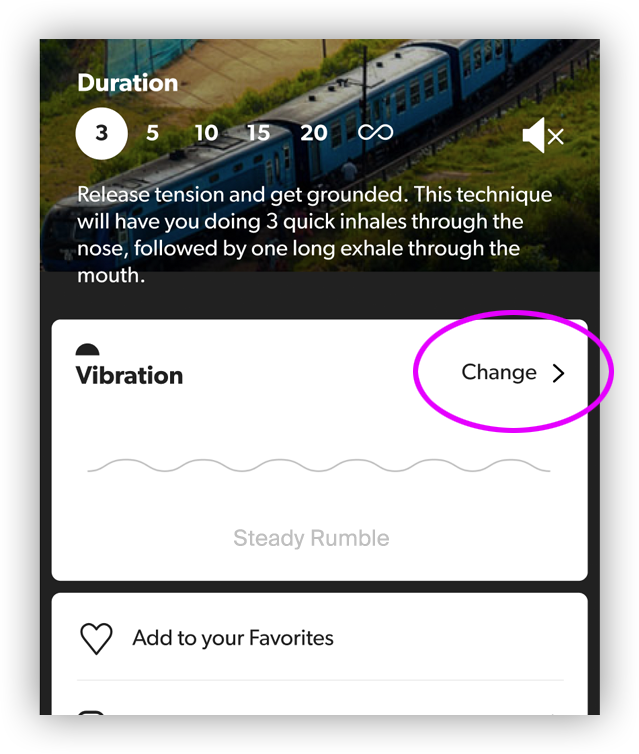 |
Disabling VibrationsThe vibration pattern can be customized for any Sound & Music meditation — including turning vibrations off completely. Scroll down to the details of the meditation and in the “Vibration” card, tap “Change >”. You’ll be able to choose from a list of different patterns. Choose “No vibration.” |
The meditations in the “Breath Training”, “Guided”, and “Core Studio” categories are designed to work in sync with guidance from the Core device. For these types of meditations, you won’t be able to customize the vibrations or disable them.
If you want to play one of these meditations without Core’s vibrations, you can always switch to Device-Free mode and listen to the audio only.